Finding the best budget tablets for students can significantly improve productivity, online learning, and digital note-taking — without straining your finances. In 2026, affordable tablets offer strong battery life, reliable performance, stylus compatibility, and cloud integration at prices that fit student budgets.
This in-depth buying guide compares top student tablets under a reasonable budget, analyzes value for money, and helps you choose the right device based on study needs, portability, and long-term reliability.
Why Students Are Choosing Budget Tablets Over Laptops
While laptops remain essential for certain academic programs, budget tablets are increasingly popular because they:
- Are lightweight and portable for campus use
- Offer long battery life (8–14 hours average)
- Support digital note-taking apps
- Integrate easily with Google Drive, Microsoft 365, and cloud storage
- Cost significantly less than premium laptops
For reading PDFs, attending virtual classes, watching lectures, and light productivity, a budget tablet often delivers excellent performance at a lower price point.
Quick Comparison: Best Budget Tablets for Students
| Tablet | Display | Battery Life | Storage | Best For | Typical Price Range |
|---|---|---|---|---|---|
| Apple iPad (9th Gen) | 10.2″ Retina | Up to 10 hrs | 64–256GB | Note-taking & apps | Mid budget |
| Samsung Galaxy Tab A9+ | 11″ LCD | Up to 12 hrs | 64–128GB | Android users | Affordable |
| Lenovo Tab M10 Plus (3rd Gen) | 10.6″ | Up to 12 hrs | 64–128GB | Media + study | Budget-friendly |
| Amazon Fire HD 10 | 10.1″ | Up to 13 hrs | 32–64GB | Reading & streaming | Low budget |
| Xiaomi Pad SE | 11″ | Up to 14 hrs | 128GB | Multitasking | Strong value |
Prices vary by region, retailer deals, and seasonal discounts.
Top Budget Tablets for Students – Detailed Review
1. Apple iPad (9th generation) – Best for Long-Term Academic Use

The iPad (9th Gen) remains one of the most recommended tablets for students due to software stability and app availability.
Why it stands out:
- Retina display for clear reading
- Access to thousands of educational apps
- Smooth performance for multitasking
- Apple Pencil (1st Gen) support for handwritten notes
Pros
- Excellent app ecosystem
- Reliable software updates
- Strong resale value
Cons
- Accessories sold separately
- Slightly older design
👉 Ideal for students who want longevity, structured note-taking, and stable performance.
2. Samsung Galaxy Tab A9+ – Best Android Tablet for Students
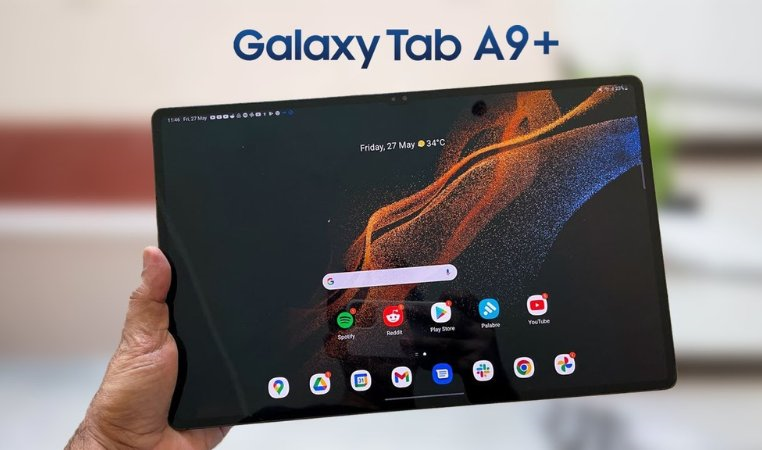
This tablet offers strong value for Android users seeking affordability and screen size.
Key highlights:
- Large 11-inch display
- Multi-window support for research + note-taking
- Expandable storage
- Solid battery performance
Pros
- Good value for money
- Smooth everyday usage
- Affordable accessories
Cons
- Not ideal for heavy editing tasks
- LCD instead of AMOLED
👉 Great for students using Google Workspace and Android-based apps.
3. Lenovo Tab M10 Plus (3rd Gen) – Best Balanced Budget Tablet
A strong mid-range performer offering dependable features at a competitive price.
Best for:
- Reading eBooks
- Watching lectures
- Light document editing
Pros
- Slim design
- Good audio quality
- Reliable battery life
Cons
- Average camera
- Limited for advanced multitasking
👉 Suitable for high school and university students who prioritize value.
4. Amazon Fire HD 10 – Best Low-Cost Tablet for Basic Study
If your budget is tight, the Fire HD 10 offers affordable access to digital learning.
Strengths:
- Very competitive price
- Good battery endurance
- Durable build
Limitations:
- Limited Google Play integration (requires setup)
- Not built for heavy multitasking
👉 Best for reading textbooks, streaming lectures, and light assignments.
5. Xiaomi Pad SE – Best Value for Performance
A powerful choice for students who need performance without premium pricing.
Highlights:
- Smooth refresh rate display
- Strong processor for multitasking
- Competitive pricing in ecommerce marketplaces
Pros
- Great price-to-performance ratio
- Good battery optimization
- Modern design
Cons
- Stylus compatibility varies by region
- Software updates may vary
👉 Ideal for multitasking students handling research, streaming, and document editing.
How to Choose the Best Budget Tablet for Students
1. Performance & RAM
- Minimum 4GB RAM recommended
- 6GB+ for multitasking
2. Storage Capacity
- 64GB minimum
- Expandable storage is a plus
3. Battery Life
- Look for at least 10 hours
- Fast charging improves convenience
4. Stylus & Keyboard Support
- Important for note-taking and assignments
5. Ecosystem Compatibility
- Apple ecosystem vs Android ecosystem
- Cloud storage integration
Pros and Cons of Budget Tablets for Students
Advantages
✔ Affordable compared to laptops
✔ Lightweight and portable
✔ Strong battery life
✔ Access to productivity apps
Disadvantages
✘ Limited for advanced software (e.g., coding IDEs, heavy editing)
✘ Accessories may increase total cost
✘ Performance varies by model
Student Tablet Buying Tips
- Compare prices across verified ecommerce platforms
- Watch for back-to-school sales and seasonal discounts
- Check warranty and return policies
- Consider refurbished devices from certified sellers
- Read independent reviews before purchasing
Frequently Asked Questions (FAQs)
1. Are budget tablets good for university students?
Yes, they are suitable for note-taking, research, reading PDFs, and attending online classes. For advanced software tasks, a laptop may still be required.
2. How much RAM does a student tablet need?
At least 4GB is recommended, but 6GB provides smoother multitasking.
3. Can budget tablets replace laptops?
For basic productivity and learning tasks, yes. For heavy programming or design software, laptops remain more suitable.
4. Is 64GB storage enough for students?
It is sufficient for most users, especially with cloud storage, but 128GB offers better flexibility.
5. Should students buy Wi-Fi or LTE tablets?
Wi-Fi models are more affordable. LTE versions are helpful if campus Wi-Fi is unreliable.
Final Recommendation: Which Budget Tablet Should You Choose?
The best budget tablet for students depends on academic needs and ecosystem preference:
- Choose Apple iPad (9th Gen) for long-term reliability and app ecosystem.
- Pick Samsung Galaxy Tab A9+ if you prefer Android flexibility.
- Select Lenovo Tab M10 Plus for balanced affordability.
- Consider Amazon Fire HD 10 for entry-level budgets.
- Go with Xiaomi Pad SE for performance-focused value.
Each of these tablets offers strong student value without crossing into premium pricing, making them smart, practical investments for modern learning.